
 Получите свидетельство
 Вход
Вход


Organization moment
(Greeting, Duty Report)
Brush up your Phonetics “The main parts of the computer”
System block, Display, Software, Mouse, Mouse pad, Keyboard, Hard Disk Driver,
| Floppy Disk Driver, Screen, Motherboard |
Warm up
Make up the words: Keyboard, Motherboard, Mouse, Modem, Scanner, Flame.
Word Bank
Do the Crossword using the parts of computer.
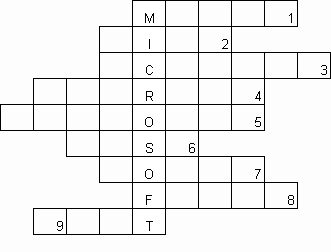
This small box is used to operate a computer.(mouse)
A document on your computer. (file)
A device which is used to transfer photos and texts to your computer. (scanner)
To make a computer better or able to do more things. (upgrade)
This looks like a typewriter and has the keys you need to press . (keyboard)
It can be hard. It can be floppy. (disk)
A device which allows your computer to send messages along a telephone line. (modem)
An unfriendly or rude e-mail. (flame)
To start a computer. (boot)
Puzzle Time
Find the computer jokes
You can’t teach an old dog new tricks.
You can’t teach an old mouse new clicks.
Don’t bite off more than you can chew.
Don’t take more bytes than you can process.
Give a man fish and you feed him for a day!
Teach him to use a net and you feed him for a life time.
VI. Match the definitions using the computer language
| 1 | access | a | connected with the computer network |
| 2 | doubt | b | to supply |
| 3 | current | c | belonging to the present time |
| 4 | on-line | d | a feeling of being unsure |
| 5 | predict | e | have the ability or right to enter or use |
| 6 | provide | f | take the place of smb or smth |
| 7 | remain | g | see or describe the future |
| 8 | replace | h | continue to be unchanged |
VII. Speaking 1 Work with interactive board using the presentation “Live Forever”.
Find the item in the picture and write the corresponding letter next to the word.
Password c, online shopping h, mouse f, search engine g, keyword a, website d,
click b, screen e.
Fill in the gaps with the words from the box.
Search engine 2) keyword 3) click 4) websites 5) screen 6) online shopping
7) password
Put the following computer operations in the correct order. Keys: g, c, a, e, d, b, f
Make up the dialogue using the puzzles.
Hello! Who is speaking?
Computer helpline, Ron is speaking.
Can you help me?
What is the problem?
Well, my computer seems to have crashed.
How exactly?
Well, I can’t move anything even cursor just sticks in the same place.
The best thing to do is to switch it off the computer and start again.
Do you think that will help?
Yes, that’s what I would do.
OK. I’ll give it a try.
How is it getting on?
It’s OK. Thanks a lot.
No problem.
VIII. Speaking 2
Students have to introduce the presentation “Advantages and Disadvantages of the computers”.
Answer the questions using the terms of computer.
1. What computer system makes it possible to send letters very quickly? (E-mail)
2. What system allows computer users around the world to send and to obtain information? (The Internet)
3. What programs provide colourful pictures and sound? (Multimedia)
4. What is the name of a computer-created “world”, which seems almost completely real? (Virtual reality)
5. What do we call a disk on which a large quantity of information can be stored? (Hard disk)
6. What do you call a sudden, unexpected computer failure? (Crash)
Watching video “10 Top most Amazing Technologies”.
Please, write down True or False.
Google smart glasses. T
Leap motion. T
3D Printing. T
Transparent Phone. T
Flexible Technology. T
Flying Car Newest Technology. T
Fastest Aircraft Evacuation. F
Nano Technology. F
Wildcat robot Technology. F
Relation
The list of Evaluation
| At lesson I worked | actively / not actively |
| With my work at the lesson I | satisfied / not satisfied |
| During the lesson I got | tired / not tired |
| My mood became | better / worse |
| The material of the lesson was | interesting / not interesting |
| I think my today’s mark is | Good/ not good |
Theme: Live Forever
Lesson’s Targets:
1. to develop critical thinking;
2. to introduce a new vocabulary; to revise lexical material;
3. to bring up interest to the lesson.
Grade: 8E, 13 pupils
Date: 30.11.16
Equipment: computer, presentation, interactive board, cards
The plan of the lesson
| 1 | Organization moment
| (Greeting, Duty Report)
|
| 2 | Brush up your Phonetics | “The main parts of the computer”
|
| 3 | Warm up
| Make up the words |
| 4 | Word Bank
| Do the Crossword |
| 5 | Puzzle Time | Find the computer jokes
|
| 6 | Match the definitions
| using the computer language |
| 7 | Speaking 1 | Work with interactive board using the presentation “Live Forever”. |
| 8 | Speaking 2 | Students have to introduce the presentation. Answer the questions. |
| 9 | Watching video “10 Top most Amazing Technologies”. | Please, write down True or False.
|
| 10 | Relation
| The list of Evaluation
|
SBS ” MURAGER”
MASTER – CLASS
“LIVE FOREVER”
BY ENGLISH TEACHER: BORODAVKINA
ANASTASSIYA PETROVNA
KARAGANDA 2016
 "LIVE FOREVER" Открытый мастер-класс (49.51 KB)
 0
0 500
500 11
11 Нравится
0
Нравится
0


