
 Получите свидетельство
 Вход
Вход


Short term plan 13/ 1
| Lesson 1 7.2 Communication and technology Term 1 Unit 2 | School: №6
| ||||
| Date: 03.10.17 | Teacher name: Ossadchaya V.V.
| ||||
| Lesson title | Vocabulary Communication | ||||
| Grade: Grade 7_ | Number present: | absent: | |||
| Learning objectives(s) that this lesson is contributing to(link to the Subject programme) | 7.C2 Use speaking and listening skills to provide sensitive feedback to peers. 7.L5 Recognise the opinion of the speaker(s) in supported extended talk on a range of general and curricular topics. 7.S2 Ask complex questions to get information about a limited range of general topics and some curricular topics. 7.S7 Use appropriate subject-specific vocabulary and syntax to talk about a range of general topics, and some curricular topics. 7.UE6 Use a variety of possessive and reflexive pronouns including mine, yours, ours, theirs, hers, his, myself, yourself, themselves on a growing range of familiar general and curricular topics. | ||||
| Lesson objectives | All learners will be able to:
| ||||
Most learners will be able to:
about the topic without support;
support
possessive and reflexive pronouns Some learners will be able to:
support
technology items with 2-3, possessive and reflexive pronouns
| |||||
| Language objectives
| Use grammar structures in Past Simple, possessive and reflexive pronouns, because/ because of/ the reason | ||||
| Value links | Respect, cooperation, functional literacy | ||||
| Cross curricular links | Social Studies, ICT | ||||
| Useful classroom language for dialogue/writing | Twee,t social media post, blog post ,Skype tm, text message, phone call, forum gear (audio visual equipment,) to access a page/, to browse websites/, to click a desktop icon, to copy a document, to go online, to paste a sentence, to cut and paste an image, to send an attachment, to surf the web/net to share a file, to download music, to upload email | ||||
| Previous learning | Students have studied ‘hobby’ topic, can talk and write about their likes and dislikes | ||||
| ICT skills | Acquisition of ICT specific vocabulary | ||||
| Plan | |||||
| Planned timings | Planned activities | Resources | |||
| Start 5 min
| 1.Leading-in stage (W) Teacher greets students and asks question: How are you today? 2.Interactive Starter (W) Teacher shows the funny picture and students should guess the topic of the lesson. 3.Teacher tells the students the objectives of the lesson - Ask and answer personal questions with some support - Use some topic vocabulary to create 5-6 sentences - Explain the usage of applying the technology items with the help of some tips, using possessive and reflexive pronouns
Warm-up Students write three words in each category. Three things with a screen._______________________ Three things you can switch on.___________________ Three things that belong to a computer._____________ Three types of communication ____________________ Three types of communication in the past____________
| Board, lesson objectives PowerPoint Presentation (see the attached file) Video file https://www.youtube.com/watch?v=xDvpoYJuzKo CNET: Top Five Back to School Gifts
| |||
| Middle 5 min 10 min 15min
| Activity(I) Listening and Speaking Task 1(W) Students watch a video about communication technologies and write down top five tech gifts for students they hear. Task 2 (W) Additional questions: - Why has the author of this video decided to shoot it? -What are the top five back to school tech gifts in our country? Make a list of the five items. -Is it a good idea to use these technologies for studying at school? Why? Why not? -Would you like any of these back-to-school tech gifts? Which ones? Why? Activity II Development of Vocabulary Task 3(W/I) Students go over the following vocabulary words from the video: a/v gear (audio visual equipment, could ask students to give examples like blue ray player, TV and new streaming gear like Roku, Apple TV, Amazon Fire TV etc.)
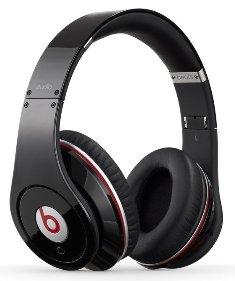
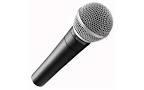
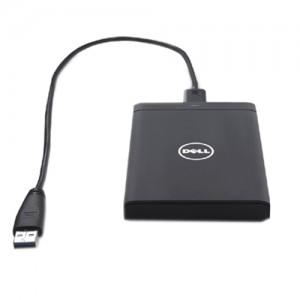
Development of Vocabulary(I/P/G) Task 1(I) Students match technology vocabulary to objects/technology items.
Differentiation Less confident students will be able to check meaning of the words looking at the PowerPoint Presentation (Slide 6) and after it; they match pictures with technology items.
Task2 (G) After this exercise, students brainstorm what can be done with each new technology item. Students must use appropriate verbs (i.e. -smartphones record videos, -flash drives save files, -digital camera take photos etc.) Each group writes their ideas on the board, the group with the most ideas wins. Ask students what technology items are common in use in Kazakhstan. Task 3 (I) Students complete the sentences using new words Feedback: Students express their opinions about new ideas that they have acquired participating in the activity
Activity III Practice(I/P) Students get introduced to the phrases, related to technology items:
12.to upload email/ … Students write their own sentences using the new verbs. (i.e. I like to download music onto my MP3 player.) Peer assessment: Students swap their exercise books to check the sentences. In case of any hesitation about the sentence structures, encourage them to consult with more capable classmates or a teacher. Differentiation Allow less confident learners to give different levels of response (differentiation by outcome) Some learners ask and answer a fewer number of questions (differentiation by task). More confident learners review ways of saying ‘why’, for example because/ because of/ the reason is etc. which examples of technology they cannot live without and why
I like to download music onto my MP3 player so that to listen to the new songs
Then learners in pairs ask and answer questions. Select those questions, which you predict they can answer in English. This may only be 5 or 6 each. Activity IV Listening
|
SB ex. 1-2p. 17 CD 1.8
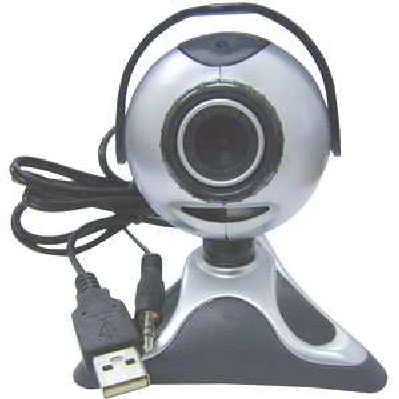
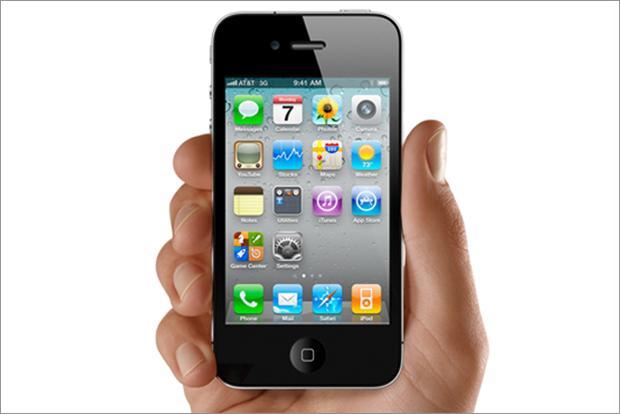
Handout 1 Match the technology items
Three sets of pictures and three sets of words Board, markers SB ex. 5-6 p. 17 SB ex. 4p. 17 CD 1.9 | |||
| 5 min (I) | Reflection I think the lesson was productive, because I was able to…… What I could not do before, and now I do not have any difficulties? What technology items have you learnt ? Homework WB ex 1-4p. 13 |
| |||
Handout 1
Match the technology items
|
| MP3 Player |
|
| Webcam |
|
| USB flash drive |
|
| Smartphone |


|
| Headphones |
|
|
microphone |
|
|
tablet |
|
|
Digital camera |
|
|
cable |
|
|
Control pad |
|
| External hard drive |



 Lesson plan "Vocabulary communication" (752.43 KB)
 0
0 999
999 17
17 Нравится
0
Нравится
0


